
Sitemap.xml in SEO: The Complete Guide to Better Indexing
A sitemap is one of the most underrated tools in technical SEO. While most focus on content and backlinks, sitemap.xml dictates how quickly and completely search engines discover your website.
🗺️ Mastering types, auditing, Google submission, and avoiding crucial technical mistakes from the ground up. 🚀✨
What Is a Sitemap?
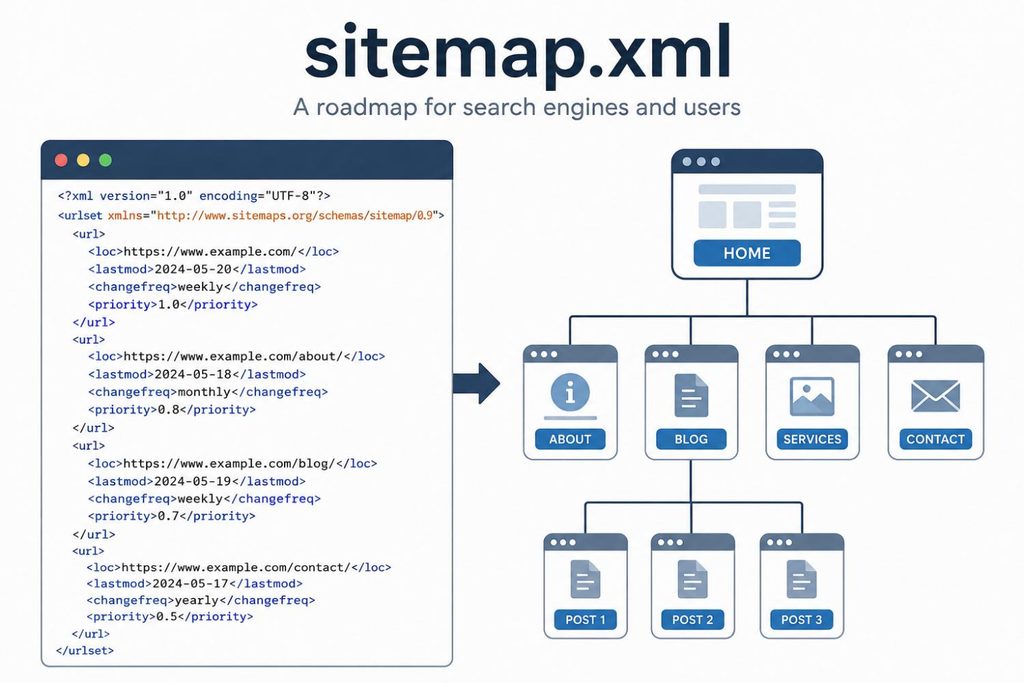
At its core, a sitemap is a file that maps out the structure of a website: its important URLs and how they relate to one another. Think of it as a table of contents written primarily for crawlers rather than human visitors.
XML Sitemaps
Built specifically for search engine crawlers and following a strict, machine-readable format. They carry extra metadata, such as when a page was last updated to optimize discovery.
HTML Sitemaps
Ordinary web pages that link to a site’s key sections, designed to help human users navigate smoothly rather than feed engine crawlers.
Why a Sitemap Matters for SEO
A sitemap doesn’t replace solid internal linking, but it complements it — especially on larger or more complex sites. Here are the core benefits of maintaining a pristine XML sitemap:
Efficient Discovery
Crawlers get a structured list of relevant URLs instead of relying solely on internal links, which matters most for large sites working within a limited crawl budget.
Faster Indexing
The lastmod attribute flags recently updated or newly published pages, helping Google notice content changes and fresh publications much sooner.
Technical Health Insight
Google Search Console shows how many submitted URLs actually got indexed, serving as a useful early warning sign for underlying technical issues.
International Support
Hreflang attributes embedded directly inside the sitemap can clearly flag language and regional variants of a page for global search engines.
A Lifeline for Newer Sites
When a young site has very few internal and external links in place yet, a sitemap acts as a critical lifeline to ensure pages get discovered in the first place.
How an XML Sitemap Is Structured
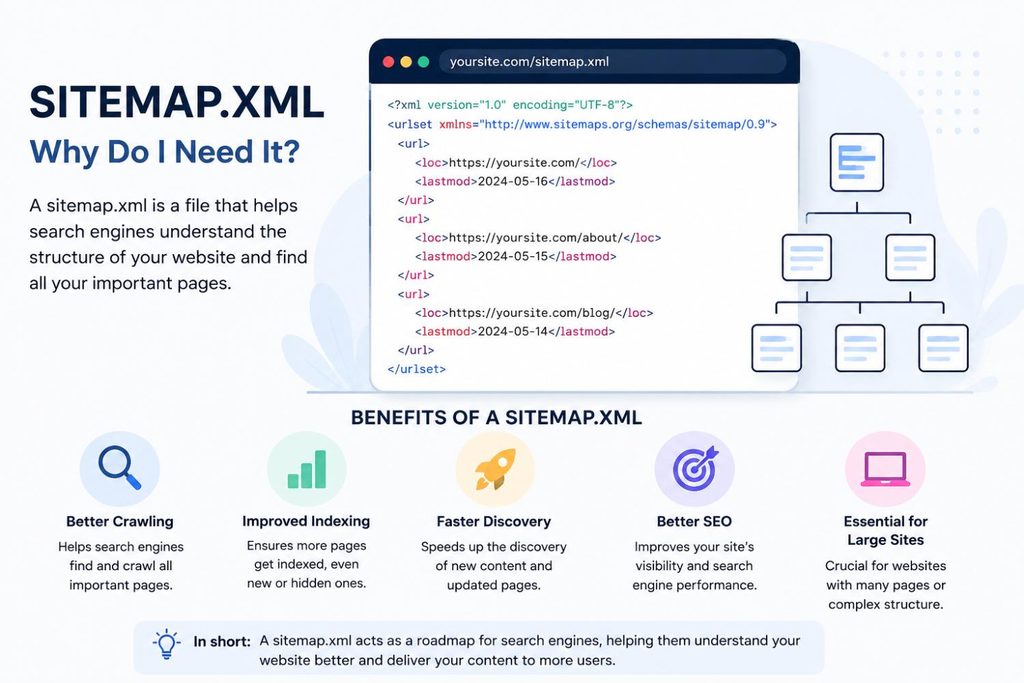
An XML sitemap follows a defined protocol (the sitemap.org standard). Each URL sits inside its own <url> block and includes key technical elements.
<loc> (Canonical URL)
Defines the full, canonical URL of the page. This is one of the two primary fields worth paying attention to in modern technical SEO.
<lastmod> (Modification Date)
Indicates the date the content was last meaningfully changed. Essential for signaling fresh updates to crawlers alongside <loc>.
<changefreq> (Frequency)
Specifies how often the page is expected to change. Note that this tag is largely ignored by Google in modern search environments.
<priority> (Relative Weight)
A relative priority value between 0 and 1. This parameter is also mostly disregarded by Google now in favor of automated evaluation.
How to Find a Sitemap
Not every website makes its sitemap easy to locate. Here are the most reliable ways to track one down when auditing a site:
1. Standard URL Directly
The most common location is simply domain.com/sitemap.xml. On WordPress sites, this often redirects automatically to an index file such as sitemap_index.xml.
2. Search Operators
Commands like site:domain.com filetype:xml or site:domain.com inurl:sitemap can surface a sitemap through a regular Google search.
3. Google Search Console
Under “Indexing” → “Sitemaps,” you’ll find every sitemap ever submitted, along with its current indexing status and performance metrics.
4. Inside robots.txt
Best practice calls for a direct sitemap reference inside the robots.txt file, which is almost always positioned near the end of the text.
Common Sitemap Errors (and How to Fix Them)
Having a sitemap isn’t enough on its own — it also needs to be kept clean. These are the technical issues that show up most often during SEO audits and how to resolve them:
Non-Canonical URLs
If a listed page points elsewhere via a canonical tag, it sends a conflicting signal to Google. Only true canonical versions belong in the sitemap.
Redirects & Error Pages
URLs returning 3xx, 4xx, or 5xx status codes waste crawl budget and should be removed from your sitemap configuration consistently.
Orphaned Pages
URLs appearing in the sitemap without internal links elsewhere on the site send weak signals — link them internally or drop them.
Blocked Pages
Pages excluded via robots.txt or “noindex” tags have no business being in the sitemap — that creates a direct contradiction for crawlers.
HTTP URLs on HTTPS Sites
Listing non-secure URLs on a secure site introduces duplicate-content risk and can trigger active browser security warnings.
Missing Robots.txt Reference
Without an explicit sitemap directive inside your robots.txt file, search engine crawlers may take longer to discover the file initially.
Submitting a Sitemap to Google
Once the sitemap is clean, it’s worth actively submitting it to Google. Doing so speeds up discovery and gives you access to useful diagnostic data.
1. Select Property
Open Google Search Console and select the right website property you want to audit and manage.
2. Navigate to Sitemaps
In the left-hand menu, click “Sitemaps” located directly under the “Indexing” section.
3. Enter Sitemap URL
Enter the full sitemap URL (e.g. https://domain.com/sitemap.xml) into the designated input field.
4. Submit File
Click “Submit” to send your sitemap directly to Google for processing and status evaluation.
Which Pages Belong in a Sitemap — and Which Don’t
A sitemap isn’t a place to dump every URL that technically exists. It should only include pages meant to be found and indexed, ruling out filter pages, internal search results, duplicates, login areas, and staging or test pages.
Prioritizing via Keyword Research
When prioritizing what goes in, it helps to look back at your keyword research: pages targeting strategically important search terms deserve extra attention when keeping the sitemap current — those are exactly the URLs where fast indexing makes the biggest difference.
Content Refreshes & Lastmod Updates
The same applies whenever existing content gets rewritten or refreshed: that update should be reflected in the affected URL’s lastmod date so Google can pick up on the change quickly instead of waiting for its next regular crawl cycle.
XML vs. HTML Sitemaps: Do You Need Both?
XML sitemaps are the modern standard and worth having on almost any website — they’re cheap to create and offer real upside for indexing. HTML sitemaps, on the other hand, have lost a lot of relevance over the years.
XML Sitemaps (The Standard)
Essential for modern websites. Google has repeatedly pointed out that a well-structured site — with clear navigation, breadcrumbs, and thoughtful category pages — usually makes an HTML sitemap unnecessary for crawlers.
HTML Sitemaps (Human Utility)
Not harmful, but secondary. On very large sites with thousands of subpages, they can add extra internal linking and give users another way to orient themselves, provided they aren’t treated as a substitute for proper site architecture.
Sitemaps for Images, Videos, and News
Beyond the standard XML sitemap for regular pages, there are a few specialized variants worth knowing about for rich media and fast-moving publishing verticals.
Image Sitemaps
List the images hosted on a page to help them surface in Google Image Search — particularly useful for ecommerce catalogs or photography-heavy sites where images aren’t easily discoverable through the HTML alone.
Video Sitemaps
Provide metadata like duration, thumbnail location, and content rating, helping video content appear prominently in dedicated video search results.
News Sitemaps
Built for sites approved for Google News, including only content published within the last 48 hours since news indexing prioritizes speed over completeness.
Static vs. Dynamic Sitemap Generation
There are two broad approaches to keeping a sitemap up to date. Choosing the right generation model determines your long-term technical maintenance overhead.
Static Sitemaps
Generated once and only updated manually. This approach is workable for very small, rarely changing sites, but introduces a major maintenance risk for anything publishing regularly since it’s easy to forget and let go stale.
Dynamic Sitemaps
Regenerates automatically whenever content is added, removed, or updated. Most CMS platforms and SEO plugins handle this out of the box, making dynamic generation the practical default for the vast majority of sites.
Sitemap vs. Robots.txt: Not the Same Job
It’s easy to conflate these two files since they often get mentioned together, but they do opposite jobs in technical SEO.
Robots.txt (Restrictions)
Tells crawlers where they’re not allowed to go. It functions entirely as a set of negative access restrictions.
Sitemap.xml (Invitations)
Does the reverse: it actively points crawlers toward the specific pages that should be crawled and indexed.
Does Every Website Need a Sitemap?
Google itself says that sites with a few hundred pages or fewer may not strictly need a sitemap — provided every page is properly linked and easy for crawlers to discover on their own.
The Small-Site Exception
For smaller properties under a few hundred pages, search engines can generally navigate via standard internal links without a sitemap.
The Practical Reality
In practice, there’s rarely a good reason to skip one: the effort to create a sitemap is minimal, while the potential upside — especially for sites that publish or update content regularly — is significant.
Final Thoughts
A sitemap.xml isn’t a ranking lever in the traditional sense, but it is a fundamental piece of technical SEO that helps search engines reliably find a site’s relevant pages, notice new content faster, and surface technical problems early.
The Foundation for Growth
Keeping the sitemap clean, auditing it regularly, and making sure it only ever contains canonical, indexable URLs lays a solid foundation for everything that follows — from SEO strategy to keyword research to content production.
Explore More Case Studies
Discover how tailored digital strategies and multi-channel performance architectures drive results across different international markets and industries:
Let’s Scale Your Growth
Ready to dominate search results and maximize your return on ad spend? Drop us a message and our team will get back to you shortly.

Send Us a Message
Fill out the form below and we’ll schedule a discovery call.
10 Most Frequent Questions About Sitemap.xml
Clear answers to the technical nuances, submission guidelines, and best practices surrounding sitemaps in modern SEO.
1. What is the primary purpose of an XML sitemap?
An XML sitemap acts as a structured table of contents for search engine crawlers, mapping out a website’s important URLs and metadata to ensure faster and more efficient content discovery.
2. Does a sitemap guarantee that my pages will be indexed?
No. A sitemap serves as an invitation, not an instruction. Google decides independently whether and when a URL gets indexed based on quality, relevance, and technical accessibility.
3. What is the URL limit for a single sitemap file?
A single sitemap file is capped at 50,000 URLs or 50MB uncompressed. Larger websites must split their URLs across multiple files bundled together using a sitemap index file.
4. Should I include non-canonical or redirected URLs in my sitemap?
Never. Only true canonical, indexable URLs belong in a sitemap. Including redirects (3xx), error pages (4xx/5xx), or non-canonical URLs wastes crawl budget and sends conflicting signals.
5. Does Google still care about <changefreq> and <priority> tags?
Mostly no. While these tags are part of the legacy sitemap protocol, Google has repeatedly confirmed that it largely disregards change frequency and priority values, focusing instead on the lastmod attribute.
6. Do small websites with fewer than 100 pages need a sitemap?
Technically, Google can discover small sites via internal links alone. However, implementing a dynamic sitemap requires minimal effort and provides an immediate safety net for fast discovery.
7. Can robots.txt block URLs that are listed in the sitemap?
No. Doing so creates a direct contradiction: robots.txt tells crawlers not to enter, while the sitemap invites them in. This forces search engines to distrust the sitemap configuration.
8. How often should I resubmit my sitemap to Google Search Console?
Submission is a one-time action for the sitemap URL itself. New or updated content is picked up automatically whenever the lastmod date updates, eliminating the need for manual resubmissions.
9. What is the difference between an XML sitemap and an HTML sitemap?
XML sitemaps are machine-readable protocols built strictly for search engine crawlers. HTML sitemaps are user-facing web pages designed to help human visitors navigate large site structures.
10. How often should I audit my sitemap for technical errors?
Websites publishing regularly should run automated technical audits (using tools like Screaming Frog) at least monthly — or weekly if new content goes live on a daily basis.