
Canonical Tags in SEO: Fixing Duplicate Content
Duplicate content can fragment your ranking power across filter parameters, trailing slashes, and old URLs. Search engines need to know which single version of a page deserves to rank—and that is where canonical tags come in.
🎯 Master what canonical tags do, why they matter for technical performance, how to set them up correctly, and the critical mistakes that quietly undermine your SEO efforts.
What Is a Canonical URL?
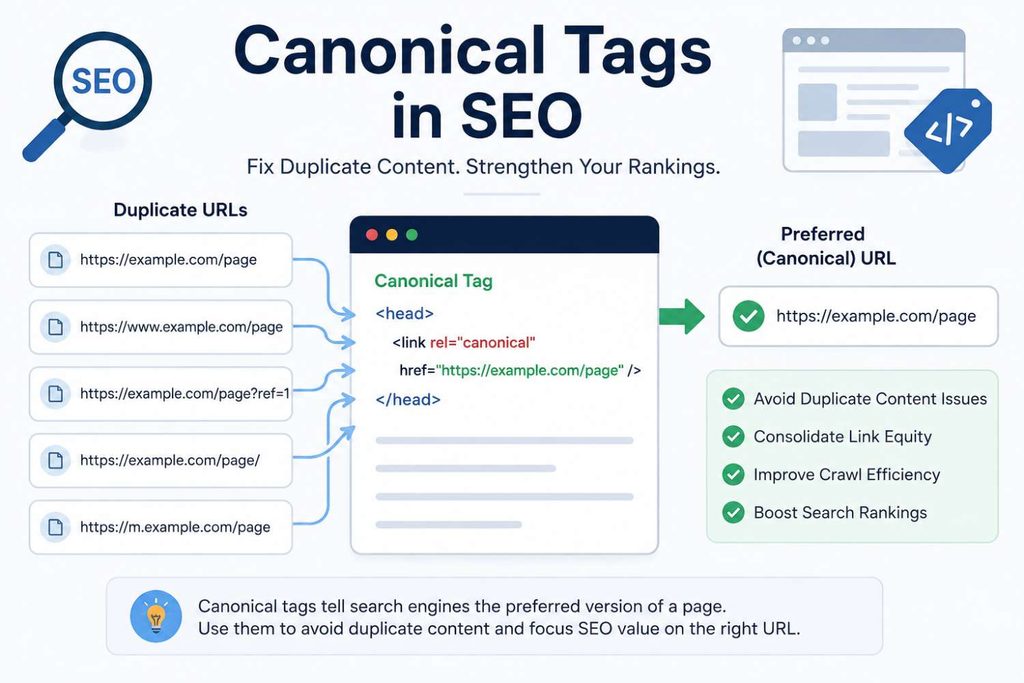
A canonical URL is the version of a page that you want search engines to treat as the “real” one — the version that gets indexed, ranked, and credited with any links pointing to it. When several URLs display identical or nearly identical content, you pick one as canonical and tell search engines to consolidate everything toward it.
URL Consolidation Example
Both load the same product grid, but only one should show up in search results and collect ranking value:
- Preferred:
yourshop.com/sneakers/ - Duplicate:
yourshop.com/sneakers/?ref=newsletter
A Strong Hint, Not a Command
A declared canonical is a strong hint rather than an absolute command. Google reviews the tag alongside redirects, internal links, and sitemaps—occasionally picking a different URL if it believes that better serves searchers. Keeping your signals consistent prevents this from happening.
What a Canonical Tag Looks Like
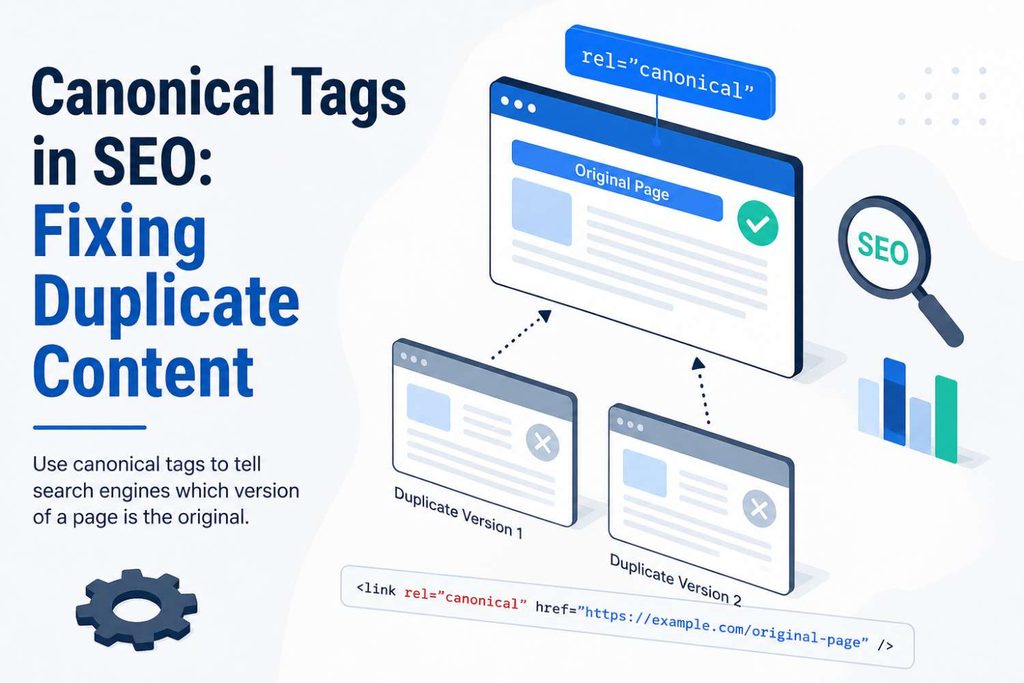
The canonical tag is a small piece of HTML placed in the <head> of a page, directing search engines on how to handle duplicate content and index preferences.
<link rel="canonical" href="https://yourshop.com/sneakers/" />The Master Copy Directive
That single line tells crawlers: “if you find other URLs with this same content, treat this one as the master copy.”
Directing Ranking Credit
It doesn’t remove duplicate pages from the internet or block them from being crawled — it simply directs ranking credit and indexing preference to the URL you’ve named.
Why Duplicate URLs Happen in the First Place
Most sites don’t set out to create duplicate content — it happens as a side effect of how modern websites are built. Here are the usual culprits behind fragmented crawl spaces:
Protocol Duplicates
The exact same page is accidentally accessible via both http:// and https:// protocols.
www vs. non-www
Both www.yourshop.com and yourshop.com are simultaneously treated as two separate domains.
Trailing Slash Inconsistencies
Addresses like /sneakers and /sneakers/ render identical content without strict redirection.
Tracking & Filter Parameters
Links tagged with strings like ?utm_source= or ?sort=price create endless clone URLs.
Session IDs
Temporary user session identifiers that some e-commerce platforms append to URLs per visit.
Separate Mobile URLs
An m.yourshop.com subdomain mirroring the main desktop site structure unnecessarily.
Pagination Overlaps
Categories split across /blog and /blog?page=2 where content overlaps heavily across pages.
Syndicated Content
Identical articles published on your primary site and licensed out to external partner publications.
Why Canonical Tags Actually Matter
It’s tempting to treat canonicalization as housekeeping — tidy, but not urgent. In practice, it directly influences four key areas of your organic performance:
Search Results & Cannibalization
Without a clear canonical, Google decides for you and doesn’t always pick your preferred version. This cleanup prevents keyword cannibalization where your own pages quietly compete against each other.
Link Authority Accumulation
If external sites have linked to a duplicate URL over the years — which happens often — a canonical tag redirects that accumulated authority right back to the page you want to rank.
Crawl Efficiency
Search engine crawlers have a finite budget. Every duplicate URL crawled is time not spent discovering your newest or most important pages, which matters heavily as sites scale.
Analytics & Reporting Accuracy
When traffic, clicks, and conversions split across near-identical URLs instead of consolidating, your reporting understates what is actually driving business success.
How to Add Canonical Tags on Popular Platforms
You rarely need to hand-code this. Most website builders and CMS platforms have a canonical field built in, or generate one automatically.
WordPress (Yoast & Rank Math)
In Yoast SEO or Rank Math, open the post editor, go to the panel, and find the “Advanced” tab for a dedicated Canonical URL field. Leave it blank for auto-generated self-referencing tags.
Shopify E-Commerce
Canonical tags are added automatically to product, collection, and blog pages. For complex multi-collection setups, custom canonicals can be added via theme code or dedicated apps.
Wix Website Builder
Self-referencing canonicals are applied site-wide by default. You can override them for specific page types or individual pages through the SEO settings panel if needed.
Custom-Built or Headless Sites
You’ll be manually inserting the <link rel="canonical"> tag directly into your page templates, which usually means involving a developer.
Self-Referencing Canonical Tags
Here’s a detail that trips people up: even a page with zero duplicates should carry a canonical tag pointing to itself. This is called a self-referencing canonical, and it looks exactly like a regular one, just aimed at the page’s own URL.
Removing Ambiguity
Why bother if there’s nothing to consolidate? Because it removes ambiguity. Google’s guidance treats a self-referencing canonical as a clear, low-effort signal reinforcing your preferred URL structure.
Confirming Plugin Automation
Especially useful when other signals — redirects, sitemaps, internal links — don’t perfectly agree. Most SEO plugins add this automatically, but it’s worth confirming rather than assuming.
Alternatives to the Canonical Tag
The rel="canonical" tag isn’t the only way to tell search engines which URL you prefer. Depending on the situation, one of these might be the better tool for consolidating duplicate content:
301 Redirects
The right call when you’re permanently retiring a duplicate URL rather than keeping both versions live, such as merging an old HTTP page into its HTTPS equivalent.
rel="canonical" HTTP Header
Useful for non-HTML files like PDFs, where there’s no <head> section to place a tag in. This requires server-level access to configure.
Sitemap Inclusion
Listing only your preferred URLs in the XML sitemap and leaving out parameterized or duplicate versions. On its own, this is a weak signal, but it reinforces the other methods.
Canonical Tag Best Practices
A handful of habits keep canonicalization working the way it’s supposed to:
Absolute URLs Only
Always use absolute URLs, including the protocol and domain. https://yourshop.com/sneakers/, not /sneakers/.
Match Your Domain Conventions
Match your site’s actual protocol and domain conventions. If your site runs on HTTPS and www, your canonicals should consistently point to those versions.
Trailing Slash Consistency
Be consistent with trailing slashes — pick one convention (e.g., always include or never include) and use it everywhere your canonicals point.
Exactly One Canonical
Declare exactly one canonical per page. Multiple conflicting canonical tags on the same page tend to get ignored by search engines altogether.
Pair with Hreflang
Pair canonicals correctly with hreflang tags on multilingual sites. Each language version should self-canonicalize while listing all language alternates.
Audit Regularly
Audit your canonical setups regularly. Configurations drift over time as CMS updates, plugins, and manual edits pile on top of each other.
Mistakes That Quietly Break Canonicalization
Even well-intentioned setups go wrong in predictable ways. Avoid these common errors to prevent search engines from ignoring your canonical directives:
Canonical to a Redirect
Pointing a canonical to a page that redirects elsewhere creates a loop of conflicting signals (“index this” vs. “this is gone”) that search engines have to resolve — often not in your favor.
Canonicalizing Non-Duplicates
Canonicalizing unique pages (e.g., similar-but-distinct products) should be avoided. Each should have its own self-referencing canonical. Search engines disregard canonicals that make no logical sense.
Blocking in Robots.txt
Blocking the canonical URL in robots.txt is a critical error. If crawlers can’t access the target page, they cannot transfer any ranking value or trust signal to it.
Incorrect Noindex Combination
Combining noindex with rel="canonical" incorrectly can produce unpredictable results. These are different instructions with different intents, and mixing them without understanding the interaction is risky.
Tag Placement Outside <head>
A canonical tag anywhere else in the HTML — including inside the <body> — is simply ignored. This can happen accidentally due to malformed markup or improper JavaScript injection.
Duplicate Conflicting Tags
Letting the CMS and a plugin both generate canonical tags produces duplicate, conflicting tags on the same page. This scenario often goes unnoticed until a manual audit turns it up.
Auditing Your Canonical Tags
Ensuring your canonicals are correctly implemented and respected by search engines is an ongoing process. These two primary tools cover most of what you need for a robust audit:
Google Search Console (GSC)
Use the URL Inspection tool on key pages. Check the “Page indexing” section to compare “User-declared canonical” against “Google-selected canonical.” A mismatch indicates Google chose differently than you intended, requiring investigation.
Full-Site Crawlers
Employ tools like Semrush, Ahrefs, or Screaming Frog. These flag issues across your entire site at once — including broken links, canonical chains, and pages with no declared canonical — rather than checking one URL at a time.
Bringing It Together
Canonical tags won’t make a weak page rank — they don’t add authority out of nowhere. What they do is make sure the authority your site already has, through links, content, and crawl signals, lands on the right page instead of getting diluted across near-identical copies.
Simplicity Over Complexity
For most sites, getting this right is a matter of consistent conventions (protocol, trailing slashes, self-referencing tags) rather than complicated technical work.
The Foundation: Keyword Research
If you’re building out new content and want it to actually earn that authority, solid keyword research is the step that comes before canonicalization even becomes relevant. It’s hard to consolidate ranking signals for a page that was never built around the right query to begin with.
Let’s Scale Your Growth
Ready to dominate search results and maximize your return on ad spend? Drop us a message and our team will get back to you shortly.

Send Us a Message
Fill out the form below and we’ll schedule a discovery call.
15 Most Frequent Questions About Canonical Tags in SEO
Explore comprehensive answers regarding duplicate content, self-referencing tags, absolute URLs, search intent signals, and ongoing optimization for your website’s canonical strategy.
1. What is a canonical tag in SEO?
A canonical tag is an HTML element that tells search engines which version of a page you want to treat as the “real” one, allowing you to consolidate indexing preference and link equity toward a single master URL.
2. Why is canonicalization considered a core pillar of technical SEO?
Without clean canonicalization, duplicate URLs dilute ranking power, fragment analytics data, and waste limited crawl budgets on near-identical copies rather than your main destination pages.
3. What are the common causes of duplicate URLs?
Standard culprits include protocol discrepancies (http vs. https), domain variations (www vs. non-www), trailing slash inconsistencies, tracking and filter parameters (?utm_source, ?sort=price), and pagination setups.
4. What is a self-referencing canonical tag and why use it?
Even a page with zero duplicates should carry a canonical tag pointing to itself. This removes ambiguity and acts as a clear signal reinforcing your preferred URL structure against accidental parameter variations.
5. Where must the canonical tag be positioned within the HTML?
A canonical tag must reside directly inside the `
` section of a document. Any tag placed in the `` or elsewhere is completely ignored by search engine crawlers.6. Should you use absolute or relative URLs in canonical tags?
Always use absolute URLs, including the protocol and domain (e.g., `https://yourshop.com/sneakers/`), rather than relative paths (`/sneakers/`), to ensure absolute clarity for crawlers.
7. Can a single page contain multiple canonical tags?
No. Declaring multiple conflicting canonical tags on the same page creates confusion, causing search engines to ignore all of them and guess the correct destination independently.
8. Is a canonical tag a strict command or a hint?
It is a strong hint rather than an absolute command. Google evaluates the tag alongside other signals like internal links, sitemaps, and redirects, occasionally overriding it if another URL serves searchers better.
9. How do canonical tags protect against keyword cannibalization?
By forcing search engines to consolidate ranking authority from alternative duplicate paths onto one chosen URL, you stop your own pages from quietly competing against each other for the same search query.
10. What happens if you canonicalize a page to a URL that redirects?
This creates a toxic loop of conflicting signals (“index this” versus “this is gone”) that forces search engines to resolve the contradiction manually, usually resulting in unfavorable ranking outcomes.
11. When should you use a 301 redirect instead of a canonical tag?
Use a 301 redirect when you are permanently retiring or moving a duplicate URL so users never land on it. Use a canonical tag when both duplicate versions must remain live and accessible for users.
12. How do popular platforms like WordPress or Shopify handle canonicals?
Most CMS platforms and SEO plugins (like Yoast, Rank Math, or Shopify’s native core) automate self-referencing canonicals and allow custom overrides directly inside their respective settings panels.
13. Can you combine noindex with a canonical tag?
Mixing a `noindex` instruction with a canonical directive sends contradictory intent instructions to search engines and should be avoided unless managed through specialized advanced architectures.
14. What are the best alternatives to page-level canonical tags?
Alternatives include server-configured HTTP response headers (ideal for non-HTML assets like PDFs), explicit XML sitemap inclusion rules, and permanent 301 redirects.
15. How should you routinely audit your canonical implementation?
Combine full-site crawlers (like Ahrefs, Semrush, or Screaming Frog) to find broken links and chains at scale with Google Search Console’s URL Inspection tool to catch Google-selected vs. user-declared mismatches.