
Hreflang Explained: Right Language Version to the Right Visitor
If you run a website that exists in more than one language — say a German blog, its French translation, and an English version sitting next to it — you’ve probably run into a frustrating problem: Google keeps showing the wrong version to the wrong visitor. A French reader lands on your German page. A German reader gets served the English one. Rankings for your translated pages stall even though the content itself is solid.
The fix for this is a small piece of code called hreflang. It has a reputation for being confusing — even Google’s own John Mueller has called it one of the trickiest parts of technical SEO — but the core idea is genuinely simple once you see it in context. This guide covers what hreflang is, how to implement it correctly, which tools actually make the job manageable, and why it’s worth the effort in the first place. 🚀✨
What Is Hreflang?
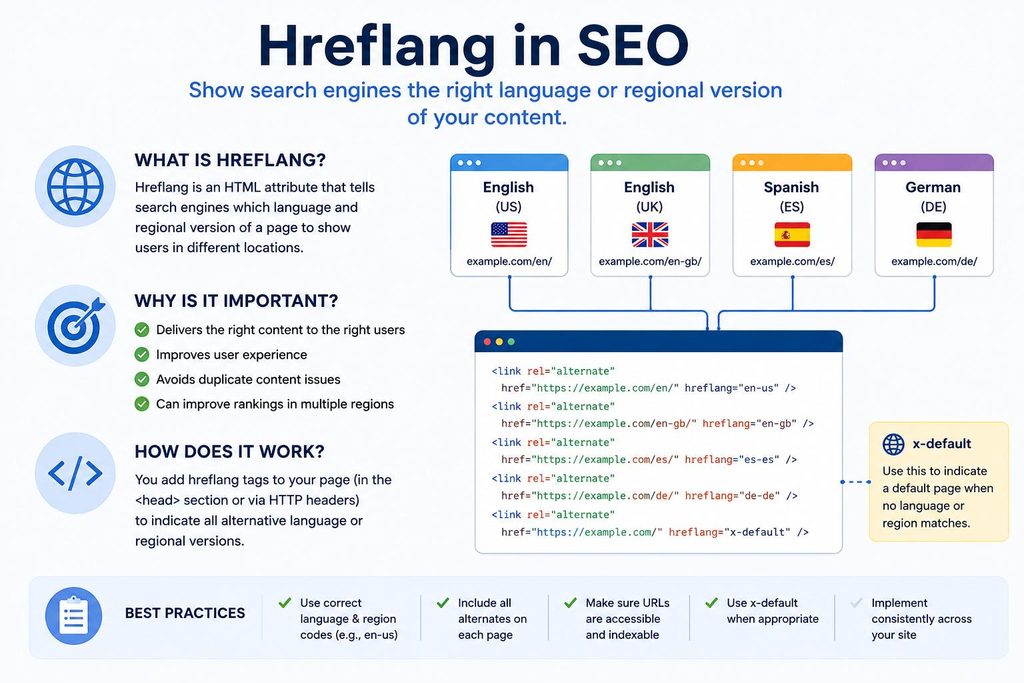
Hreflang is an HTML attribute that tells search engines which language and, optionally, which country a specific page is meant for. When you have several versions of essentially the same page — one in German, one in French, one in English — hreflang tags link those versions together and tell Google (and other engines) which one to serve depending on the searcher’s language and location.
<link rel="alternate" hreflang="de" href="https://example.com/de/page/" />
Breaking that down:
Rel Attribute
rel="alternate" tells the search engine this is an alternate version of the current page.
Language Code
hreflang="de" specifies the language of that alternate version — in this case German.
Destination URL
href="..." points to the actual URL of that version.
Regional & Country Targeting
You can also target a specific country in addition to a language, using the format language-country, such as de-at for German speakers in Austria or fr-ca for French speakers in Canada. This matters when the same language is spoken differently across regions, or when you need to show different pricing, currency, or local details to otherwise identical-language audiences.
Real-World Application in Barcelona
Picture a network of travel blogs covering the same European cities in three languages — German, French, and English — the way many independent publishers build them today. A German-language guide to Barcelona’s top attractions, a French version of that same guide, and an English one are not competing pages; they’re translations of one concept. Hreflang is what tells Google “these three URLs are the same article, just in different languages — show German speakers the German one, French speakers the French one, and fall back to English for everyone else.”
How Do You Use Hreflang?
There are three accepted ways to implement hreflang. Which one makes sense depends mostly on the size of your site and how comfortable you are editing sitemaps versus page templates.
HTML tags in the page <head>
The most common approach for small to mid-sized sites. You add one <link> tag per language variant inside the <head> section of every page in the cluster.
<link rel="alternate" hreflang="de" href="..." />
<link rel="alternate" hreflang="x-default" href="..." />
Easy to understand, but gets messy fast when managing dozens or hundreds of manual translations.
HTTP headers
For non-HTML files such as PDFs, there’s no <head> to place a tag in, so hreflang gets declared in the HTTP response header instead.
This method works for regular web pages too, but it’s mainly used for document types that can’t carry HTML markup.
XML sitemap markup
For larger multilingual sites, adding hreflang directly into the XML sitemap is usually the cleanest option, because every relationship lives in one file instead of being scattered across pages.
Avoids bloating page load with extra header tags and makes bulk updates far easier.
Three rules that apply no matter which method you choose
Whichever implementation method you pick, three things need to be true, or your hreflang setup will quietly fail:
Tags are bidirectional
If your German page links to the French version, the French version must link back to the German one. Search engines treat these as reciprocal declarations — if only one side declares it, the whole cluster gets ignored or misread. Every page needs to reference every other page, including itself.
Self-referencing tags are good practice
Each page should include a hreflang tag pointing to itself, not just to its siblings. Google has said this is technically optional, but it’s still the recommended default and avoids ambiguity.
Use an x-default tag
This declares a fallback page for visitors whose language doesn’t match any of your listed variants — useful for a homepage or a general landing page that isn’t tied to one specific language.
A Word of Caution & Best Practice
Hreflang tags work on a best-match basis, not a guarantee. Google looks for a language-and-country match first, falls back to a language-only match, and finally falls back to x-default. It’s a strong signal, not a directive.
Avoid IP Redirects: Don’t try to solve this with automatic redirects based on IP address or browser language instead of hreflang. Auto-redirecting visitors and search engine crawlers is explicitly discouraged because it can prevent crawlers from discovering your other language versions entirely. Use a small on-page banner suggesting a better-matched version instead!
Which Tools Do You Need?
You don’t need to hand-write hreflang tags for every page forever. A handful of tools cover the entire lifecycle — building the tags, implementing them, and auditing for errors afterward.
Spreadsheet-Based Generator
For small-to-medium multilingual sites, a simple spreadsheet listing each URL by language, with a formula that spits out the matching hreflang/XML block, is often enough to keep things organized without any paid software. This is the most practical starting point if you’re managing a handful of translated blogs rather than an enterprise site.
SEO Crawler with Hreflang Auditing
Tools like Ahrefs Site Audit or Semrush Site Audit crawl your site and flag broken hreflang relationships automatically — missing return tags, invalid language codes, pages referencing non-canonical URLs, and so on. Running one of these on a schedule is the single best way to catch problems before they quietly cost you rankings.
Google Search Console
The International Targeting report (where available) and the URL Inspection tool let you check exactly how Google sees a given page’s hreflang relationships and whether return tags are being picked up correctly.
XML Sitemap Generator or CMS Plugin
If your site is built on WordPress, Webflow, or a similar CMS, plugins exist that can auto-generate hreflang sitemap entries whenever you publish a translated version of a post, removing the manual step entirely.
Hreflang Tag Validator
Several free online validators let you paste in a URL and confirm the tags are syntactically correct and properly reciprocal before you rely on them.
For a lean, self-managed multilingual site — three or four language versions of the same content, published gradually over time — a spreadsheet plus a periodic crawl with a site-audit tool is usually the sweet spot: automated enough to catch mistakes, simple enough not to need a dedicated engineer.
Why Is Hreflang Important?
Prevents Cannibalization
Stops near-identical multilingual pages from competing against each other by clearly signaling deliberate regional variations to search engines.
Improves User Experience
Directs searchers straight to their native language version instantly, lowering bounce rates and preventing frustrating language mismatches.
Unifies Cluster Authority
Links translated variants into a single coordinated set, allowing ranking signals and authority to support the entire group effectively.
Scales Global Expansion
Provides a solid architectural foundation to test content locally and expand into new international regional markets smoothly over time.
Final Thoughts
The Core Principle
Hreflang isn’t complicated in principle — it’s one attribute doing one job: matching the right language version of a page to the right visitor. Where people get tripped up is consistency at scale: forgetting the self-reference, missing a reciprocal tag when a new translation goes live, or letting a redirect rule quietly override what the tags are trying to say.
Execution & Long-Term Success
Get the three rules right — bidirectional tags, self-referencing tags, and a sensible x-default — pick an implementation method that fits the size of your site, and run a periodic audit. Do that, and hreflang stops being “one of the most complex parts of SEO” and becomes what it’s actually meant to be: a quiet, reliable signal that keeps your multilingual content working for you instead of against itself.
Wrapping Up Your International SEO Strategy
Mastering hreflang is a vital step in bridging global vision with local execution. To build a robust, high-performing multilingual website, ensure your technical foundation works seamlessly alongside your broader SEO architecture.
Keyword Research
Discover how to target international search intent and analyze realistic volume across core regions.
Content Copywriting
Learn how to craft natural, high-converting copy tailored for multi-market audiences.
Canonical Tags
Prevent keyword cannibalization and consolidate link equity cleanly across your site architecture.
XML Sitemaps
Explore how to streamline bulk updates and manage your multilingual links efficiently at scale.
15 Most Frequent Questions About Hreflang
Explore detailed accordion-style answers covering syntax, implementation methods, reciprocal rules, and best practices for international SEO success.
1. What is an hreflang attribute in technical SEO?
Hreflang is an HTML attribute that tells search engines which language and, optionally, which country a specific page is meant for, linking translated variations together.
2. How do hreflang tags prevent duplicate content issues?
They explicitly inform search engines that near-identical text across different regional URLs represents deliberate language variants rather than accidental duplicate content.
3. What does a basic hreflang HTML tag look like?
A basic implementation looks like: <link rel="alternate" hreflang="de" href="https://example.com/de/page/" />, specifying the alternate relationship, language code, and target URL.
4. How do you target specific countries alongside languages?
You use the language-country format, such as de-at for German speakers in Austria or fr-ca for French speakers in Canada, to handle local pricing or regional dialects.
5. What are the three accepted ways to implement hreflang?
You can use HTML tags inside the page <head> section, HTTP headers (primarily for non-HTML assets like PDFs), or direct markup inside your XML sitemap.
6. When should you use HTTP headers for hreflang?
HTTP headers are specifically used for non-HTML files such as downloadable documents or PDFs that lack an HTML <head> element to host standard tags.
7. Why is XML sitemap markup preferred for large sites?
It centralizes all cluster relationships into a single file, preventing page weight bloat and making bulk additions or updates significantly easier than editing individual templates.
8. Why are bidirectional (reciprocal) links mandatory?
Search engines treat relationships as reciprocal declarations. If Page A links to Page B, Page B must link back; otherwise, the entire cluster will be ignored or misread.
9. Are self-referencing hreflang tags necessary?
Yes. Although technically optional according to search engine documentation, including a self-referencing tag on every page removes ambiguity and acts as a strong best-practice default.
10. What is the role of the x-default attribute?
The x-default value declares a fallback page for users whose browser language doesn’t match any of your listed localized variants, perfect for global landing hubs.
11. Is hreflang a strict directive or a search engine signal?
It operates on a best-match basis as a strong signal rather than an absolute guarantee, meaning engines evaluate context alongside user location and intent.
12. Why should you avoid automatic IP-based redirects?
Forced IP or browser-language redirects can prevent automated search engine crawlers from ever discovering your alternate language variants, completely breaking your cluster architecture.
13. Can hreflang clusters combine ranking signals?
Yes. Coordinated clusters can share ranking power, allowing a strong original version to help lift the visibility of its translated sibling pages.
14. What tools help manage and audit hreflang configurations?
Spreadsheet generators, SEO crawlers like Ahrefs or Semrush, Google Search Console, and dedicated XML sitemap plugins streamline implementation and catch errors early.
15. What happens when hreflang mistakes scale across a website?
A single broken tag is a minor glitch, but duplicated errors turn into major structural SEO problems that quietly suppress your international search traffic over time.