
How to Create Landing Pages
That Actually Rank in Google
Landing pages have a reputation problem in SEO. Most marketers build them for one job only: converting paid traffic. Short copy, a single call-to-action, minimal text — great for a Google Ads campaign, terrible for organic search.
If you want a landing page that also ranks, you need to treat it as a hybrid asset: persuasive enough to convert, but substantial enough for Google to understand and trust. 🚀✨
Why Most Landing Pages Fail at SEO
Before fixing anything, it helps to understand why the typical landing page struggles organically.
Too Little Content
Google needs enough text to understand what the page is about and what query it should answer.
No Clear Search Intent Match
A page built purely to convert PPC traffic often skips the informational content that organic visitors are actually looking for.
Weak Internal Linking
The page exists in isolation, disconnected from the rest of the site’s topical authority.
Duplicate or Thin Messaging
Templated landing pages built for multiple locations or campaigns often repeat the same paragraphs with minor swaps, which Google can flag as duplicate content.
Missing Technical Basics
No proper heading hierarchy, no canonical tag, no sitemap inclusion — small oversights that quietly cap your ranking potential.
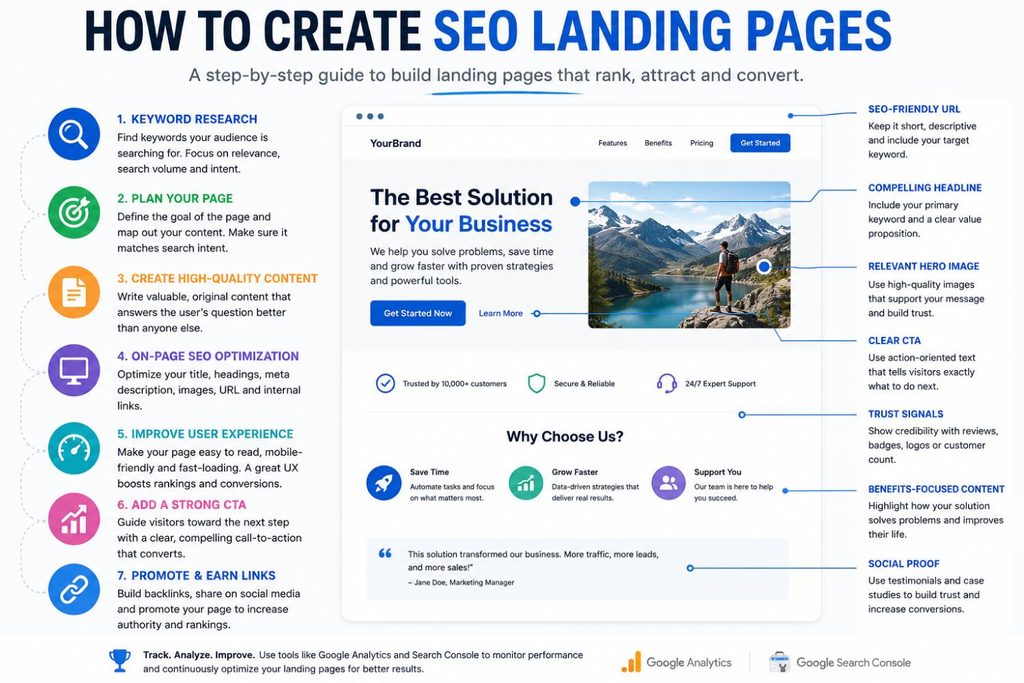
Step 1: Mastering Keyword Research for Organic Growth
Effective keyword research bridges the gap between what your audience is searching for and what your website offers. It provides the foundational data needed to structure high-performing content that drives qualified traffic.
Search Intent Alignment
Understanding why users search for specific terms ensures your pages match informational, commercial, or transactional expectations.
Targeting Niche Queries
Long-tail keywords often feature lower search volume but significantly higher conversion intent, making them valuable targets.
Assessing SERP Landscape
Analyzing what currently ranks helps determine the depth, structure, and quality required to compete effectively.
Topical Mapping
Grouping related keywords into structured silos establishes strong topical authority and clean internal linking paths.
Step 2: Use a Clean, Descriptive URL
The URL is one of the easiest wins on a landing page, and one of the most commonly ignored. A URL built around a random ID or an auto-generated campaign string tells Google (and the user) nothing about what the page is about.
Compare /page?id=48213 to /landing-pages-for-seo. The second version instantly communicates relevance, both to a crawler trying to understand your site hierarchy and to a user deciding whether to click a search result. A few quick rules:
Keep it Short & Descriptive
Use real, human-readable words — ideally including your primary target keyword for maximum context.
Match Search Language
Match the language your audience actually searches in, including translated versions for multilingual sites.
Avoid Unnecessary Parameters
Steer clear of tracking strings, dynamic parameters, or deeply nested folders that don’t reflect actual site structure.
Step 3: Build a Clean, Logical Heading Structure
Google relies heavily on your heading hierarchy to understand what a page is about and how the content is organized. This matters even more for landing pages, which are often built visually first and structured as an afterthought.
Rules worth following on every landing page:
One H1 Only
Contains your primary keyword, and used as the actual page title — not just a big headline graphic.
H2s for Benefits
Used for each major section or benefit, ideally including secondary keywords where they read naturally.
H3s for Supporting Details
Placed underneath each H2, rather than skipping straight to bullet points, maintaining clear context.
No Styling-Only Tags
If a large-looking piece of text is a design element, don’t wrap it in an H2 or H3 just to make it bigger — this confuses crawlers about structure.
Step 4: Write Enough Content to Actually Rank
There’s no universal magic word count, but a landing page competing for a competitive commercial keyword typically needs more than the 300–400 words most templates ship with. Look at what’s currently ranking for your target keyword and treat that as your baseline, not your ceiling.
To add substance without turning the page into a wall of text:
Add an FAQ Section
Answer the 4–6 questions users most commonly search alongside your target keyword.
Short Explainer Section
Include a brief section near the top that addresses informational intent before pushing the conversion angle.
Specific, Concrete Language
Use precise wording rather than generic marketing claims — Google’s quality systems reward content that demonstrates real expertise over vague filler.
Scannable Chunks
Break long paragraphs into easily readable chunks; density kills both readability and dwell time.
Step 5: Solve the Duplicate Content Problem
This is where most multi-location or multi-campaign landing pages quietly sabotage themselves. If you’re running the same landing page template across ten cities or ten product variants with only the city name swapped, Google can treat these as near-duplicate content — which dilutes ranking potential across all of them.
Two tools solve this:
Canonical Tags
If you have multiple similar landing page variants (for example, an SEA version and an organic version of the same offer), a canonical tag tells Google which version is the “master” copy to index and rank, preventing internal competition between near-identical pages.
Genuine Differentiation
For location or variant pages you do want indexed individually, each one needs unique details — local testimonials, region-specific pricing, or content that couldn’t be copy-pasted onto a competing page without editing.
Step 6: Make Sure Google Can Actually Find the Page
A perfectly optimized landing page that Google never crawls doesn’t rank. This is especially common with landing pages built outside the main site navigation for paid campaigns — no internal links point to them, and they’re excluded from the sitemap by default.
Checklist:
Add to XML Sitemap
Add the page to your XML sitemap so search engines know it exists and should be crawled.
Link to It Internally
Link to it internally from at least one relevant blog post, category page, or navigation menu — orphan pages struggle to rank regardless of content quality.
Check robots.txt
Check robots.txt to confirm the page isn’t accidentally blocked, which happens more often than you’d expect with campaign-specific URL structures.
Verify Indexing Status
Verify indexing status in Google Search Console once the page is live, and request indexing manually if it hasn’t been picked up after a few days.
Step 7: Optimize Technical Basics That Get Overlooked
Beyond structure and content, a handful of technical details consistently separate landing pages that rank from ones that don’t:
Core Web Vitals
Google measures loading performance (Largest Contentful Paint), responsiveness, and visual stability (Cumulative Layout Shift) as direct ranking inputs. Compress images, set explicit width and height on media so the layout doesn’t jump as the page loads, and defer any non-essential JavaScript.
Mobile Responsiveness
Google indexes the mobile version of your site by default, so a landing page that looks great on desktop but breaks on mobile will underperform regardless of content quality.
HTTPS Security
A secure connection is a baseline trust signal, and browsers actively flag non-HTTPS pages as unsafe, which hurts both rankings and conversions.
Schema Markup
Structured data helps Google understand specific elements on the page, like FAQs, reviews, or pricing, and can unlock richer search result listings.
Meta Title & Description
These directly influence click-through rate from the search results page, which is itself a ranking signal over time.
Image Alt Text
Especially relevant on visual-heavy landing pages, since Google can’t otherwise interpret what’s shown.
Putting It All Together
Converts Well & Ranks Well
A landing page that ranks isn’t a compromise between “converts well” and “ranks well” — done properly, the two reinforce each other. Clear structure and genuine substance make the page easier to trust, both for Google’s crawlers and for the human deciding whether to convert.
The Complete Workflow
Start with the keyword research, build a logical heading hierarchy, add enough real content to satisfy search intent, eliminate duplicate content risk with canonical and hreflang tags where needed, and make sure the page is actually discoverable through your sitemap and internal links.
No Redesign Required
None of these steps require a redesign. Most can be layered onto an existing landing page without touching its conversion elements at all — which makes this one of the highest-leverage SEO improvements available for pages that are currently built to convert but invisible to search.
15 Most Frequent Questions About Creating Landing Pages for SEO
Explore comprehensive accordion-style answers covering technical setup, duplicate content management, keyword optimization, and structuring high-converting pages that rank.
1. Why do most traditional landing pages fail at SEO?
Traditional landing pages often feature too little content, lack a clear search intent match, suffer from weak internal linking, use thin or duplicate messaging across variants, and omit basic technical necessities like proper headings and canonical tags.
2. How should you structure a clean, descriptive URL for SEO?
Keep URLs short, human-readable, and built with real descriptive words (ideally featuring your primary keyword). Avoid random IDs like /page?id=48213 in favor of clean structures like /landing-pages-for-seo, matching local language preferences without unnecessary tracking parameters.
3. What are the core rules for heading hierarchy (H1, H2, H3)?
Use exactly one H1 containing your primary keyword as the actual page title. Follow it with H2s for major sections or benefits incorporating secondary keywords, use H3s for supporting details underneath, and never use heading tags purely for visual styling.
4. How much content does an SEO landing page actually need?
While there is no universal magic word count, pages competing for competitive commercial keywords typically need more than the 300–400 words standard templates ship with. Treat top-ranking competitor lengths as your baseline rather than your ceiling.
5. How can you add substance without creating a wall of text?
Incorporate an FAQ section addressing 4–6 common user queries, add a brief explainer section near the top to satisfy informational intent, use concrete language instead of vague marketing claims, and break text into scannable chunks.
6. How do you solve the duplicate content problem across multiple locations?
If you deploy similar templates across multiple cities with only swapped location names, Google can flag them as near-duplicates. Solve this by ensuring genuine local differentiation (unique testimonials, localized pricing) or utilizing canonical tags.
7. When should you use a canonical tag on a landing page?
Use a canonical tag when you maintain multiple similar landing page variants—such as separate paid search (SEA) and organic versions of the same offer—to point Google to the master copy and prevent internal keyword cannibalization.
8. How does hreflang tagging protect international landing pages?
Hreflang tagging tells search engines which language or regional variant of a landing page to serve to specific international audiences, effectively eliminating duplicate content penalties across cross-border campaigns.
9. How do you ensure Google can discover unlinked campaign landing pages?
Campaign pages built outside main menus often become unranked orphan pages. Prevent this by adding them explicitly to your XML sitemap, building internal links from relevant blog or category pages, checking robots.txt directives, and verifying indexing in Search Console.
10. What role do Core Web Vitals play in landing page performance?
Google evaluates loading speed (LCP), responsiveness, and visual stability (CLS) as direct ranking inputs. Optimizing images, setting explicit dimensions, and deferring non-essential scripts safeguard your search positioning.
11. Why is mobile responsiveness non-negotiable for SEO landing pages?
Because Google indexes mobile versions by default through mobile-first indexing, a landing page that excels on desktop but experiences layout or interactive failures on mobile will severely underperform.
12. How does Schema markup enhance landing page visibility?
Structured data helps search crawlers accurately interpret precise content on your page—such as integrated FAQs, client reviews, or product pricing—which can unlock rich snippets in search results.
13. Can you optimize a landing page without changing its design layout?
Yes. Most SEO elements—such as adjusting heading tags, expanding text blocks, refining metadata, implementing canonical rules, and updating sitemaps—can be layered onto existing pages without altering primary conversion elements.
14. Does improving SEO on a landing page hurt conversion rates?
No. When done properly, conversion optimization and SEO reinforce each other. Clear logical structures, authoritative detail, and explicit search intent alignment build trust for both web crawlers and prospective human buyers.
15. How do meta titles and descriptions affect landing page traffic?
Compelling meta titles and descriptions directly dictate click-through rates (CTR) from engine results pages, providing an incremental boost that acts as a positive long-term ranking signal.